A VPN has a reputation for being a tool for tech enthusiasts, corporate employees, or people trying to access streaming content unavailable in their region, but its everyday value for ordinary privacy is easy to overlook amid all the marketing noise.
Used correctly, a VPN adds a real layer of protection for anyone connecting to public Wi-Fi, browsing from a shared network, or simply preferring that an internet provider not see every site they visit. This guide covers what a VPN really changes about your connection, how the major services compare, and where the limits of this tool lie so expectations stay realistic.
Everyday Reasons People Rely on a VPN
Public Wi-Fi at a coffee shop, airport, or hotel remains one of the clearest everyday cases for a VPN. These networks are often unencrypted or use shared passwords known to every guest, meaning traffic passing over them can, in some circumstances, be intercepted by another person on the same network.
A VPN wraps your traffic in an encrypted tunnel before it leaves your device, meaning even a compromised public network cannot easily read what sites you visit or what data you send. Internet service providers occupy a more subtle but persistent role in everyday privacy concerns. Without a VPN, your provider can see every website you visit, information that in some regions can be sold to advertisers or shared with data brokers depending on local regulations and the provider’s own policies.
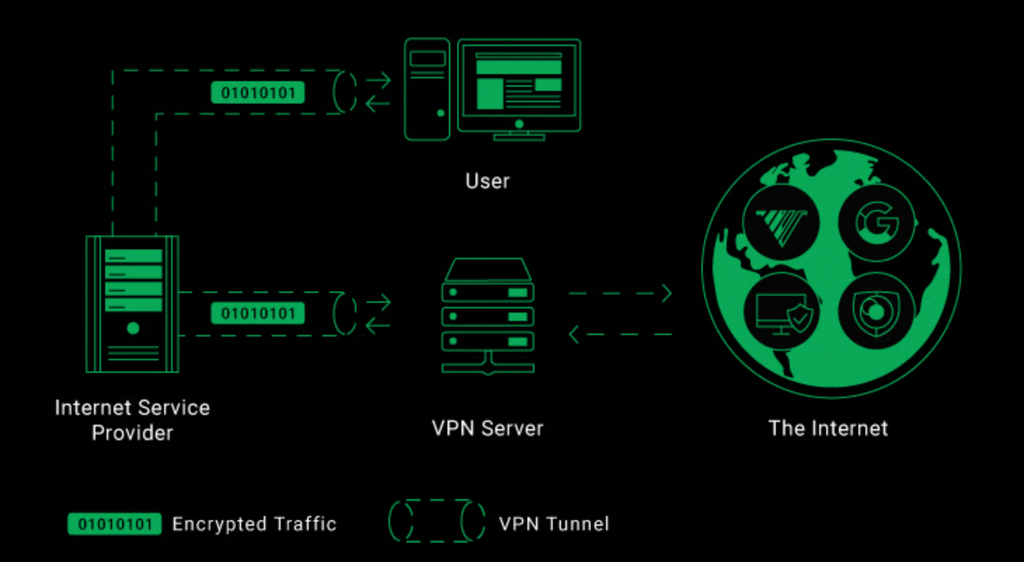
A VPN routes traffic through its own servers instead, meaning your provider sees only that you are connected to a VPN, not the specific sites you visit through it. Travelers also find real value in a VPN, especially when connecting through unfamiliar networks in hotels or shared workspaces abroad, where local network security practices may be less rigorous than at home.
Encrypting the connection through a VPN reduces the exposure that comes from routing sensitive logins, such as banking or email, through a network of unknown trustworthiness.
- Public Wi-Fi protection: Encrypts traffic on shared or unsecured networks at cafes, airports, and hotels where interception risk is higher.
- Limiting ISP visibility: Prevents your home internet provider from seeing the specific websites you visit, routing that visibility to the VPN provider instead.
- Safer remote work: Adds a layer of encryption when connecting to work resources from a home network or while traveling.
- Reduced ad tracking based on IP address: Masks your device’s IP address, making some forms of location-based ad tracking less precise.
- Peace of mind on shared networks: Useful in dorms, shared apartments, or any household network where other residents’ devices might be compromised.
VPN Encryption Explained
At a technical level, a VPN works by creating an encrypted tunnel between your device and a server operated by the VPN provider. All of your internet traffic routes through this tunnel before reaching its final destination, meaning anyone monitoring the network between your device and the VPN server sees only encrypted data rather than the real content of your browsing.
This process relies on established encryption protocols, most commonly OpenVPN or the newer WireGuard protocol, both of which use strong cryptographic methods to scramble data in a way that would take an impractical amount of computing power to break using current technology. The VPN server then decrypts your traffic and forwards it to its destination on the open internet, with the response following the reverse path back through the encrypted tunnel to your device.
This design shifts trust from your local network and internet provider to the VPN provider itself, which is an important distinction many users overlook. A VPN does not make your browsing invisible; it changes who is positioned to see it. If a VPN provider keeps detailed logs of user activity, or if it operates in a jurisdiction with weak privacy protections, the privacy benefit narrows by a wide margin compared to a provider with a strict no-logs policy independently verified through a third-party audit.
Speed is also affected by this rerouting, since your traffic now travels an extra hop through the VPN server before reaching its destination. A well-run VPN with servers close to your location and sufficient server capacity keeps this slowdown minor for most everyday browsing, though very demanding activities like large file transfers or online gaming may notice a more real dip in speed, especially when connecting to a distant server.
Reviewing NordVPN, ExpressVPN, and Proton VPN
The VPN market includes dozens of providers, but a handful have built strong reputations through independent audits, consistent performance, and transparent privacy policies.
- NordVPN: Offers a large server network, strong speeds, and additional features like malware blocking and a double-encryption option for users wanting an extra layer of protection.
- ExpressVPN: Known for consistent speed and ease of use across a wide range of devices, with a long track record of independent security audits supporting its privacy claims.
- Proton VPN: Developed by the team behind Proton Mail, it emphasizes a strong privacy-first reputation and offers a truly usable free tier, unlike many competitors that limit free access severely.
- Mullvad: Notable for not requiring an email address to sign up, instead using an account number system that reduces the personal data tied to a subscription from the outset.
- Surfshark: Offers unlimited simultaneous device connections on a single subscription, appealing to larger households wanting to cover every device without tiered device limits.
Free VPN services deserve a note of caution beyond the reputable free tiers offered by paid providers like Proton VPN. Many free-only VPN apps generate revenue by logging and selling user data, the very practice a VPN is meant to protect against, or by injecting ads into browsing sessions. Choosing an established paid provider, or a transparent free tier from a company with a broader reputable business, tends to align incentives better than an unknown free app with no clear revenue model explained anywhere in its policies.
What a VPN Cannot Protect Against
A VPN is a valuable but limited tool, and setting realistic expectations prevents a false sense of total protection. A VPN encrypts the connection between your device and the VPN server, but it does nothing to protect against threats that do not depend on network visibility, such as a phishing email that tricks you into entering a password on a fake website, or malware already installed on a device before the VPN was ever turned on.
Websites you log into can still identify you regardless of a VPN, since logging into an account, whether email, social media, or banking, ties your activity to your identity at that service regardless of what IP address the connection appears to come from. A VPN protects the pipe your data travels through, not the endpoints you willingly identify yourself to once connected.
- Phishing and social engineering: A VPN does not detect or block a deceptive email or fake login page designed to trick you into giving up credentials directly.
- Malware already on a device: Encryption of network traffic does not remove or prevent malicious software already installed before the VPN was activated.
- Account-level tracking: Logging into a service ties your identity to that account regardless of the IP address a VPN presents to the outside world.
- Browser fingerprinting: Websites can sometimes identify a device through browser and hardware characteristics that a VPN’s IP masking does not address.
- A provider’s own logging practices: A VPN service that keeps detailed logs undermines the very privacy protection users are paying for.
Pairing a VPN with other safety habits, such as a password manager, two-factor authentication, and healthy skepticism toward unexpected emails, produces a far more complete privacy posture than relying on a VPN as a single catch-all solution. Some users also mistakenly assume a VPN improves their protection against viruses or ransomware, since the term sits near other security software in marketing bundles and app store listings.
A VPN focuses purely on network traffic and does not scan files, block malicious downloads, or remove software already running on a device. Antivirus software and careful download habits remain the relevant tools for that category of risk, and treating a VPN as a substitute for either leaves a real gap in a household’s overall security setup that no amount of encrypted tunneling can close on its own.

Picking a Service for Your Household
Selecting a VPN for a household involves weighing a few practical factors beyond brand reputation alone. Device count matters, since some providers cap the number of simultaneous connections allowed under one subscription, which can matter for a household with several phones, laptops, and tablets all needing coverage under a single plan.
Server location variety affects both speed and specific use cases. A household mainly concerned with everyday privacy on public Wi-Fi benefits from a provider with strong server density in their own country or region, keeping connection speeds fast for typical browsing. A household with specific needs around accessing region-locked content legally available elsewhere benefits from a provider with a broader international server spread, though this use case sits somewhat apart from the core privacy motivation this guide focuses on.
Customer support quality is another factor easy to overlook until something goes wrong. A VPN connection that fails to establish, a kill switch that behaves oddly after an operating system update, or a billing question after a renewal are all situations where responsive support, whether through live chat, email, or a well-maintained help center, saves real frustration. Reading a handful of recent reviews focused specifically on support responsiveness, rather than only star ratings for speed or price, gives a fuller picture of what ownership looks like after the initial purchase decision is made.
Family plans and bundled pricing are worth a look for larger households, since several providers offer discounted multi-year terms or bundle a VPN alongside a password manager or antivirus suite at a combined price lower than purchasing each tool separately. Whether this bundling makes financial sense depends on whether the household would have purchased those companion tools anyway, since a bundled discount on a tool nobody in the household would otherwise use is not a real saving.
- Simultaneous device limits: Check whether a provider’s plan covers every device in the household or requires an upgrade for full coverage.
- Server network size and location: A denser, closer server network generally means faster, more reliable everyday connections.
- Independent security audits: Providers that submit to and publish third-party audits offer stronger evidence for their privacy claims than marketing copy alone.
- Kill switch feature: Automatically cuts internet access if the VPN connection drops, preventing unprotected traffic from leaking out unnoticed.
- Router-level VPN support: Some providers support installation directly on a compatible router, covering every device on the home network without individual app installs.
Price comparisons across long-term subscription plans, rather than the often-discounted first-term promotional rate, give a clearer picture of ongoing cost, since many VPN providers price an initial term attractively before renewing at a much higher rate.
Installing and Testing Your VPN the Right Way
Getting a VPN properly set up takes more than downloading an app and toggling it on once. After installing a chosen provider’s app on each device, enabling the kill switch feature in settings closes the gap where an unexpected VPN disconnection could briefly expose unprotected traffic without the user noticing.
Testing whether the VPN is functioning correctly is worth the extra few minutes after initial setup. Several independent websites let you check your visible IP address and confirm it reflects the VPN server’s location rather than your true location, along with checking for DNS leaks, a technical issue where domain name lookups bypass the VPN tunnel even while the rest of the connection is encrypted.
- Enable the kill switch: Prevents unprotected traffic from leaking out if the VPN connection unexpectedly drops during use.
- Check for IP and DNS leaks: Use an independent leak-testing website after connecting to confirm the VPN is fully routing traffic as expected.
- Set the VPN to auto-connect: Configure the app to connect automatically on device startup or when joining an unfamiliar Wi-Fi network.
- Choose the right protocol: WireGuard often offers a better balance of speed and security than older protocols for most everyday use.
- Test speed before committing long-term: Run a quick speed test with and without the VPN connected to confirm the slowdown is acceptable for daily use.
Once configured, a VPN largely runs quietly in the background, requiring little ongoing attention beyond occasional app updates and periodic confirmation that the kill switch and leak protections remain active after any major app or operating system update.
Final Thoughts
A VPN is a practical, familiar tool for everyday privacy rather than a mysterious or purely technical product reserved for specialists, and its core value, encrypting your connection and limiting what your internet provider and local network can see, applies to nearly anyone using public Wi-Fi or valuing a bit more control over their browsing visibility.
Choosing among reputable providers like NordVPN, ExpressVPN, and Proton VPN comes down to device count, server needs, and budget, while setting realistic expectations about what a VPN cannot do keeps its role in a broader privacy routine properly calibrated.
Combined with strong passwords, two-factor authentication, and basic skepticism toward suspicious messages, a VPN rounds out a sensible, achievable approach to everyday digital privacy. Start with a reputable provider, confirm the kill switch and leak protections work as intended, and let the tool run quietly in the background as one part of a broader habit of caution online.
Frequently Asked Questions
Does a VPN make me completely anonymous online?
No. A VPN hides your IP address and encrypts your connection, but logging into any account still ties your activity to your identity, and other tracking methods like browser fingerprinting can still identify a device to some degree.
Will a VPN slow down my internet connection?
Some slowdown is typical since traffic routes through an extra server, but a well-run provider with nearby servers keeps this minor for everyday browsing. Larger downloads or connections to distant servers tend to show a more real difference.
Is it legal to use a VPN?
In most countries, yes, VPN use for privacy and security purposes is legal. Some countries restrict or ban VPN use, so checking local regulations before traveling with one is worth doing if visiting a country with stricter internet controls.
Should I keep my VPN on all the time?
For most people, keeping a VPN active by default on public and unfamiliar networks makes sense, though some choose to disable it on trusted home networks for specific tasks like local network printing or device discovery that a VPN can interfere with.
Can a free VPN be trusted for privacy?
It depends heavily on the provider. A truly reputable company’s limited free tier, like Proton VPN’s, can be trustworthy, but many free-only VPN apps monetize through data collection or ad injection, undermining the privacy goal entirely.
Do I need a VPN if I already use a password manager and two-factor authentication?
A VPN addresses a different layer of protection, network-level privacy and encryption, compared to account security tools like password managers and two-factor authentication. Using all three together covers more ground than relying on any single tool alone.