The television in the living room is no longer just a screen, because most modern sets are connected computers that learn from what is shown on them. Many owners never see this happening, and the privacy menus that control it are often buried several layers deep. In this article we will explore how a smart TV tracks viewing, where the main switches sit on popular brands, and what each setting can and cannot protect.
A modern television is closer to a computer with a very large screen than to the box your parents bought. It connects to your home network, runs apps, shows advertisements on its home screen and, in most cases, reports back to its maker about how you use it. Many owners never see this because the data collection is switched on during setup, often behind a single “agree” button. This guide explains what is being collected, why the topic ended up in court, and exactly where to click on the most common brands.
The goal is not to scare you away from smart TVs. Most people want the apps, and nobody needs to throw the set out of a window. The goal is to give you a short, repeatable routine that cuts the biggest data flows in about ten minutes, plus a realistic picture of what will still be collected afterwards.
Automatic content recognition works by matching what appears on screen
ACR is the technology at the center of the privacy debate. In simple terms, the television takes frequent samples of what is being displayed, turns them into a compact digital fingerprint, and compares that fingerprint against a large library of known programs, films and advertisements. When there is a match, the system knows what you were watching at that moment. The sample can come from a streaming app, a cable or satellite box, a game console, a Blu-ray player or anything else plugged into an HDMI port.
That last point matters, because many people assume tracking only applies to the apps built into the TV. The complaints filed by Texas say the opposite: they describe ACR capturing content from YouTube, doorbell and security camera streams, AirPlay and Google Cast, and HDMI-connected devices. If that is accurate, then a family movie played from a laptop or a clip from a home camera could pass through the same recognition system as a commercial program. The complaints also say ACR can keep collecting while the TV is offline and send the data once it reconnects.
How often does the sampling happen? The numbers come from lawsuits, so they are allegations rather than proven facts. Texas alleges that screenshots are taken up to twice every second. A separate federal class action in New York against Samsung claims the company captures image and audio every 500 milliseconds, which matches the same rhythm. Whatever the exact figure turns out to be, the point is that this is continuous measurement, not an occasional check-in.
Why would a television maker want this? The answer is advertising. Knowing which programs a household watches lets a company group viewers into audiences, sell targeted advertising and measure whether an ad campaign reached the right people. The data can also be combined with other identifiers, and Texas argues that the combination can reveal sensitive traits such as race, sex, and religious or political beliefs. The business logic is easy to see: the sets are often sold at thin margins, and the viewing data keeps earning money long after the sale.
There is a precedent that shows how valuable this can be. In 2017 the Federal Trade Commission and the New Jersey attorney general fined Vizio 2.2 million dollars for using ACR to collect data on about 11 million consumers without their knowledge or consent. By 2021, according to reporting from The Record, Vizio itself said more of its profit came from selling ACR-collected data to advertisers than from selling televisions. That single fact explains why manufacturers keep the feature on by default.
Texas lawsuits put the practice under a spotlight
In December 2025, Texas Attorney General Ken Paxton filed suits against five television makers: Sony, Samsung, LG, Hisense and TCL Technology Group Corporation. The state argues that the companies violated the Texas Deceptive Trade Practices Act by collecting viewing data without the knowledge or consent of owners. It also says the companies steer people toward leaving ACR switched on, and that their disclosures are hidden, vague and misleading. These are the state’s claims, and the companies have not been found liable by a court on that basis.
The state also leaned on a market statistic. According to the lawsuits, roughly three-quarters of American households own a smart TV that uses ACR. If that figure is close to the truth, the practice is not a niche issue affecting a handful of gadget fans but a default setting inside most living rooms. In the filings for Hisense and TCL, Texas also raised concerns about possible access by the Chinese government because of those companies’ ties to China, which is a separate and more political argument.
The reaction from the companies was mixed and mostly quiet. Spokespeople for Hisense and LG said they do not comment on pending legal matters, and the other makers did not immediately respond to requests for comment when the news first appeared. The more concrete development came later: Samsung settled with the Texas attorney general. Under that agreement, as reported by Malwarebytes, Samsung agreed to stop collecting ACR data from Texans without explicit, informed consent and to rewrite its on-screen privacy prompts and dialogs.
For an ordinary owner, the settlement has two practical lessons. First, the consent screens on a television are now a legal battleground, which is a reason to read them rather than click through. Second, a change that applies to Texans does not automatically apply to everyone else. Malwarebytes made this point itself and published instructions for switching ACR off anywhere, which is exactly what the next sections cover.
Samsung also faces a federal class action in New York that was described in the same report. The complaint claims that Samsung shares viewing data with companies such as Google and X without informed consent, in violation of the federal Video Privacy Protection Act and state privacy laws. It also argues that Samsung’s privacy notice understates the activity by using the mild phrase “processing” viewing history. None of this has been decided, and you should treat the complaint as an accusation.
Samsung and LG menus hide the main switches
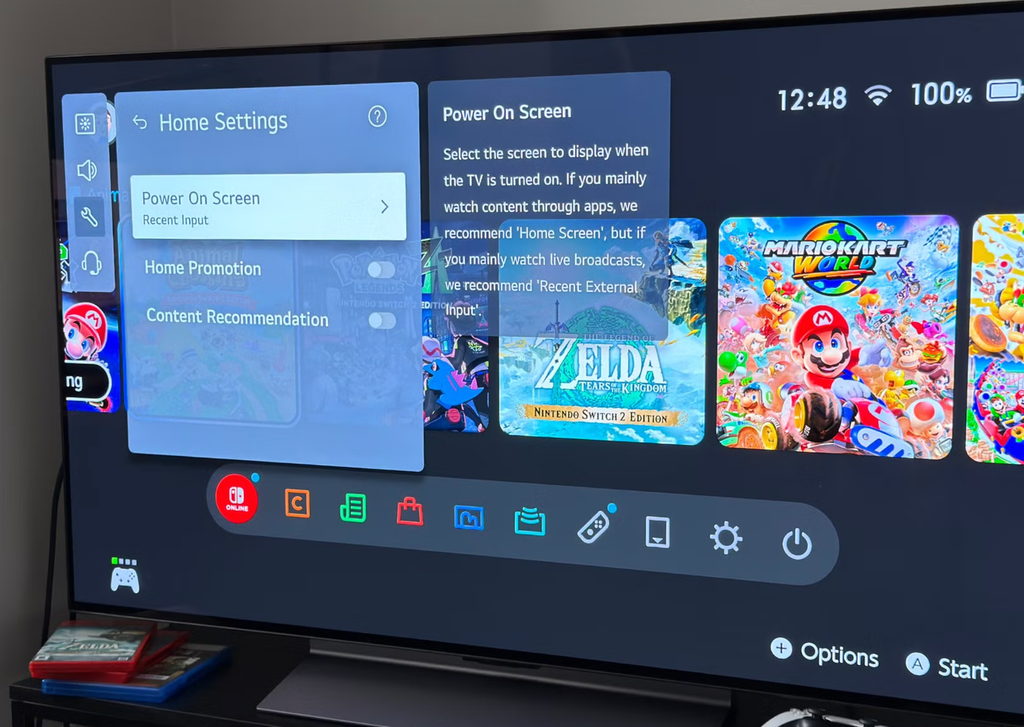
Samsung and LG sell a large share of the televisions found in homes, so their menus are the best place to start. Both put the key switch several layers deep and call it something that does not obviously mention tracking. The wording can differ by model year and region, so if your menu does not match exactly, look for the closest names in the same area.
On a Samsung set running Tizen, press Home, open Settings, then choose Support, then Terms and Privacy, then Privacy Choices. Turn off Viewing Information Services, which is the ACR switch. While
you are on the same screen, turn off Interest-Based Advertising. If you do not use voice commands, turn off Voice Recognition Services as well. Some models ask you to confirm after each change, so wait for the toggle to visibly flip.
On an LG set running webOS, the main switch is called Live Plus. Open Settings, go to All Settings, then General, then System, then Additional Settings, and turn Live Plus off. Next, look in the advertising area for an option such as Limit Ad Tracking or Do Not Sell My Personal Information and enable it. Finally, open the User Agreements screen and withdraw consent for Viewing Information, Interest-Based Advertising, Voice Information and Live Plus wherever those entries appear. The agreements page is easy to miss, yet it holds the consent records that the company relies on.
A common mistake is to switch off only one of these screens and assume the job is finished. On LG, the Live Plus toggle and the user agreements are two places that can both record your choice, so it is worth confirming both. After you finish, back out to the main settings page and reopen each screen to make sure the toggles stayed off. Some sets quietly restore defaults after a firmware update, which is a reason to repeat this check from time to time.
| Brand | Where to look | What to switch off |
| Samsung (Tizen) | Settings, Support, Terms and Privacy, Privacy Choices | Viewing Information Services, Interest-Based Advertising, Voice Recognition Services |
| LG (webOS) | Settings, All Settings, General, System, Additional Settings, and User Agreements | Live Plus, plus consent for viewing, advertising and voice information |
| Vizio (SmartCast) | Settings, Admin and Privacy | Viewing Data, and Advertising |
| Roku | Settings, Privacy | Use Info from TV Inputs, and personalized ads |
| Sony (Google TV) | Settings, Privacy | Samba Interactive TV, and ad personalization |
| Fire TV | Settings, Preferences, Privacy Settings | Device Usage Data, Collect App and Over-the-Air Usage, Interest-Based Ads |
Before you start tapping through menus, it helps to set up the situation. Grab the remote, sit near the television and keep your phone handy so you can search for any label that is unclear. Work on one brand section at a time, and after each change, back out and reopen the screen to confirm the toggle stayed off. If a switch is greyed out, it often means a parent setting or a pending agreement must be changed first, so look one level up.
Roku, Vizio, Sony and Fire TV each use different wording
Every platform names its tracking switches differently, which is part of why people give up. The table above gives the short version, and this section adds detail. Menu paths below come from published guides by Tom’s Guide and Malwarebytes, and they may differ slightly on your model.
On Vizio SmartCast, open Settings and find Admin and Privacy, which some older menus label Reset and Admin. Turn off Viewing Data, which is the ACR control, and then turn off the advertising option in the same area. Vizio is worth special attention because it is the company that was fined in 2017 over this exact feature, and the company later described data sales as a major source of profit. Do not assume that a past fine means the default is now off for you.
On Roku, including Roku-powered sets from TCL and Hisense, open Settings, then Privacy. Under Smart TV Experience, turn off Use Info from TV Inputs, which stops ACR from sampling what comes through your HDMI ports. Under Advertising, switch off personalized ads or limit ad tracking, and consider resetting your advertising identifier so that older profiles are cut loose. If your remote has a microphone, review Microphone settings and channel permissions too. Those voice controls are separate from the ACR switch.
On Sony televisions running Google TV, open Settings, then Privacy, and turn off Samba Interactive TV, which is a separate ACR system. Then switch off ad personalization in the Privacy or Ads section, which may also appear under your Google account settings. On older Sony models, you may need to open Device Preferences, then Usage and Diagnostics, and turn off reporting. The same Google TV steps apply to other brands that use that software, including many TCL and Hisense sets.
On Fire TV, which also powers some Toshiba and Insignia sets, open Settings, then Preferences, then Privacy Settings. Turn off Device Usage Data, turn off Collect App and Over-the-Air Usage, and turn off Interest-Based Ads. Tom’s Guide notes that you will still see ads after this; the change only reduces how well they are aimed at you. That distinction applies to every brand in this guide.
Advertising and voice settings deserve a second pass
Turning off ACR handles the biggest tracking channel, but it does not cover everything. Interest-based advertising is a separate permission, and it relies on an advertising identifier and on your activity inside apps. The identifier is a code attached to your device, and advertisers use it to link what you watch, what you click and what you buy. Resetting or limiting that code makes it harder to build a long history about your household.
Voice features are another area where a quick review pays off. A microphone in the remote or in the television can send recordings to a company server for processing. Many people use voice search every day and find it useful, so the right answer depends on your habits. If you rarely speak to the TV, turn the feature off; if you keep it, check whether the settings let you delete stored voice recordings and whether recordings are kept for improvement purposes.
Then there are diagnostic and usage reports. These are meant to help the company fix bugs, but they can include information about apps you open and how long you use them. Fire TV calls this Device Usage Data and Collect App and Over-the-Air Usage, while Google TV and Android TV models may place similar controls under Usage and Diagnostics. Switching them off rarely affects how the set works.
One more place to check is the account you used during setup. If you signed in with a Google, Samsung, LG or Amazon account, the account itself has privacy controls that live outside the television. Visit the privacy page for that account on a phone or computer and review ad personalization and activity history. Doing so lets you cut data that the television menu cannot reach.
Limits remain even after every toggle is off
It would be misleading to promise that a few clicks make a smart TV private. Tom’s Guide says that disabling these options stops most viewing-based tracking, and the wording “most” is deliberate. Some televisions still send limited diagnostic information, and the app on your screen still knows what you watch inside that app. Netflix, YouTube and other services keep their own viewing histories, and those histories are governed by each service rather than by the television maker.
Another limit is trust in the menu itself. Privacy Guides pointed out that the wording of these settings can be misleading, which is why it advises reading them carefully. A toggle that says “improve recommendations” may be the one that matters, while a toggle that sounds scary may do little. When a label is unclear, read the short description under it, and if there is none, search the exact label together with your model number.
The third limit is what the company already holds. Switching off ACR stops future collection, but it does not necessarily erase what was gathered during the weeks or years when it was on. Some brands offer a deletion or opt-out request through a privacy portal, and residents of some US states and other countries have legal rights to request deletion. If you care about past data, look for a privacy request form on the manufacturer site and submit it.
Finally, remember that a different device in front of the television can change the picture. A separate streaming stick or box has its own tracking settings, and those settings are not controlled by the TV menu. Choosing a new device does not remove the issue; it only moves it to a different company, so you would still need to visit its privacy settings. The advantage is that you get to choose a maker whose policies you trust, and you can replace a cheap stick far more easily than a television.
Habits around inputs and networks add protection
Once the menu work is done, a few habits protect you from the settings creeping back. The first is to be careful at setup. When a new television or a factory-reset television asks you to accept terms, do not press the quick accept button. Look for a customize or manage option, read the list of data uses, and decline the viewing-information and advertising items.
The second habit is to treat updates with suspicion, in a practical rather than paranoid way. Software updates sometimes add new features with their own permission prompts, and a prompt that appears after an update may be presented with the data-sharing option pre-selected. After each major update, spend two minutes looking through the privacy area again. It costs very little and catches the cases where a default quietly returned.
The third habit concerns the network. If you rarely use the built-in apps and rely on a separate player, you can leave the television off the Wi-Fi entirely, or connect it only when you need a software update. Be aware that Texas alleges ACR can collect while offline and upload later, so keeping a set disconnected is useful but only as an addition to turning off the setting. You can also create a guest network on your router for smart devices, which keeps them apart from laptops and phones that hold more personal information.
The fourth habit is to reduce what the set can see. Lower the number of accounts signed in on the television, avoid saving payment cards on it, and sign out of services you do not use. If your set offers a profile for children, keep it separate from adult profiles so that viewing history does not mix. These small choices limit how much of your life is attached to the identifier the television builds.
The household side of this matters too. A television is shared, so the person who changes the settings protects everyone who sits in front of it, including children and guests who never agreed to anything. Tell the rest of the family what you changed and why, so nobody switches a feature back on while trying to fix an unrelated problem. A short note about where the privacy menu lives is enough to keep the work from being undone by accident.
Conclusion
Start with the biggest single change: switch off the ACR setting for your brand using the table in this article. Do it tonight, before you watch anything else, because every hour the setting stays on is another stretch of sampled viewing. If you cannot find the exact name, look under Privacy, Terms and Privacy, User Agreements or Admin settings, and search for the brand name plus ACR together with your model number.
Next, deal with advertising and voice. Turn off interest-based or personalized ads, reset the advertising identifier if there is an option, and decide whether you want voice recognition. Then visit the account page for the service you used during setup and review the ad and activity controls there. This takes five minutes and covers the data that the television menu cannot reach.
After that, adopt the maintenance routine. Recheck the privacy menu after major updates, decline optional data sharing when the set is reset, and consider a guest network for smart devices. If you are shopping for a new television, look for a set that makes the privacy choice clear during setup, and be wary of any model that hides it. Reading reviews from outlets such as Consumer Reports and Tom’s Guide can help, since they often check how easy the controls are to find.
Finally, keep your expectations realistic. You will not erase every trace of your viewing, and some data will remain with apps, accounts and the company’s older records. But with ACR, ads and voice settings turned off, you remove the most persistent channel, and you do it without giving up the features that make a smart television useful. That is a fair trade for ten minutes of work.
It also pays to remember that privacy rules and company practices keep changing. The Texas cases and the Samsung settlement show that regulators are now paying attention to television data, and more changes to consent screens may follow. Treat your settings as something you maintain, not something you finish once, and your viewing will stay far more private than the default setup allows.