Phones and tablets have become so woven into daily routines that most people have only a rough sense of how many hours they spend looking at a screen each day. Screen time tracking apps close that gap by logging app usage, pickups, and notification counts, then presenting the data in charts that make patterns visible rather than abstract. Parents use these tools to set boundaries for children, employers use them to study workplace focus, and individuals use them simply to see where their own attention drifts.
The data these apps collect can also support healthier sleep habits, since late-night screen use is one of the easiest patterns to spot once it is logged. This guide covers how these apps work, how to choose one that fits a household or an individual, how to set limits that stick, and what tradeoffs come with handing over this kind of behavioral data.
Tracking App and Notification Patterns
At the core of every screen time tool is a log of three basic metrics: total time spent in each app, the number of times a device is picked up, and how often notifications arrive and get opened. Built-in operating system tools, such as the ones included on most modern phones, already gather this data automatically without needing a separate download, while third-party apps often add more detailed breakdowns, such as time spent per website within a browser or a running weekly trend line.
Notification counts deserve focused attention because they often reveal the real source of distraction better than raw screen time does. A person might spend two hours a day in a messaging app, but if ninety of those pickups were triggered by notifications rather than intentional checks, the pattern points toward a different kind of problem than simple overuse. Several tracking platforms now separate “active” time, where a person opened an app deliberately, from “reactive” time triggered by an alert.
- Daily totals by app: Most tools break down screen time into a per-app list, usually ranked from highest to lowest.
- Pickup frequency: A count of how many times the device is unlocked throughout the day, which often correlates with habitual checking more than any single app does.
- Notification volume: A tally of alerts received versus alerts opened, showing how much of a day is driven by outside interruptions.
- Weekly comparison charts: A rolling view that shows whether usage is trending up or down over several days rather than a single snapshot.
Reviewing this data on a weekly rather than daily basis tends to produce more useful insight, since daily numbers fluctuate with normal variation in schedule, while a weekly trend line filters out that noise and shows real movement in habits. The way this data gets presented also shapes how useful it turns out to be in practice.
A simple bar chart ranking apps by total time offers a quick snapshot, but it can mask more revealing patterns, such as a single app that dominates late-evening usage even though its daily total looks modest compared with others. Tools that break down usage by hour of day, rather than only by total minutes, surface these timing patterns more clearly, which matters for anyone trying to connect screen habits to sleep quality or focus during work hours rather than just overall volume.
Choosing a Tracking App for a Household
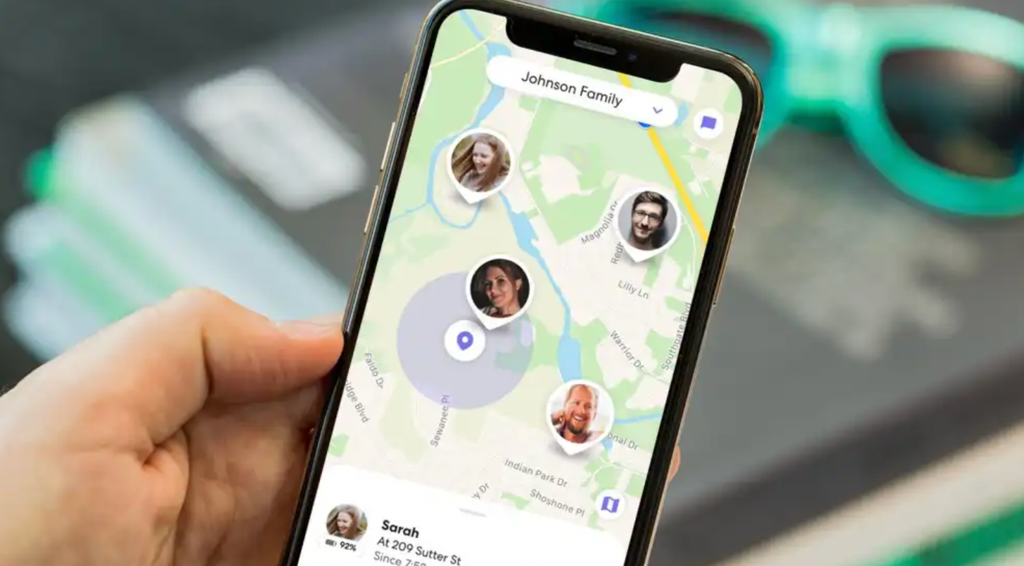
Families managing multiple devices usually need more than a single-device log; they need a dashboard that aggregates several accounts and lets a parent set rules remotely. Built-in family management tools from the major mobile platforms now cover most of these needs for free, offering app time limits, content restrictions, and location sharing within one connected system. Third-party apps still have a place when a family needs cross-platform coverage, since a household with a mix of device brands cannot always rely on one manufacturer’s tools to manage all of them.
When comparing options, the clearest differentiator is often how limits are enforced rather than just how usage is reported. Some tools lock an app entirely once a limit is reached, requiring an override request sent to a parent’s device, while others simply send a notification that a limit has passed without blocking anything. Households with younger children generally need the stricter enforcement model, while a household managing a teenager’s habits may prefer a system built around visibility and conversation rather than hard locks.
- Cross-device syncing: A family plan should cover every device type in the household without requiring a separate app for each operating system.
- Override and request flow: A clear process for a child to request extra time, and a parent to approve or deny it, reduces friction compared with a flat block.
- Bedtime scheduling: Automatic downtime windows that silence or lock most apps overnight support consistent sleep habits.
- Location sharing add-ons: Many family-oriented apps bundle location features alongside screen time limits, which can be a reason to choose one platform over another.
Cost is a factor as well, since several capable third-party platforms charge a monthly subscription per family, while built-in tools are included with the device at no added charge, a real consideration for a household managing several children’s devices at once.
Shared family calendars and reward systems built into some platforms add a layer beyond pure restriction, letting a parent link screen time privileges to completed chores, homework, or other agreed-upon responsibilities. This approach reframes the conversation around earned time rather than a fixed allowance handed out regardless of other obligations, which some families find produces less friction than a flat daily cap applied uniformly without any connection to the rest of a child’s routine.
Balancing Limits With Trust
Setting a hard limit on an app can backfire if it feels like punishment rather than a boundary a person helped set for themselves. This is true for both children and adults using these tools on their own devices. Apps that involve the user in setting their own goals, rather than imposing limits from outside, tend to produce habits that last longer than those enforced purely through restriction. A teenager who negotiates their own social media limit with a parent is more likely to respect it than one handed a number with no input.
For adults managing their own habits, the same principle applies in a different form. Many people set an ambitious daily limit in their first week using a tracking app, only to abandon the goal entirely once it is missed a few times. A more durable approach starts with a baseline reading of current habits, then sets a modest reduction target, adjusting gradually rather than attempting a dramatic cut immediately.
- Start with a baseline week: Logging normal usage without any limit in place establishes a realistic starting point before setting goals.
- Set gradual targets: Reducing usage by a small amount each week tends to stick better than an aggressive first attempt.
- Involve the user in rule-setting: Letting a teenager or even oneself help define the limit improves follow-through.
- Review progress together: Regular check-ins, rather than silent enforcement, keep the process collaborative instead of adversarial.
Trust also depends on transparency about what data a tracking app collects and where it goes, a topic covered in more detail in the next section, since a household’s willingness to adopt these tools often hinges on comfort with that data handling. Age also plays a role in how much input is appropriate to give a child when setting limits.
A younger child generally benefits from a parent setting clear, simple rules with little negotiation, since the concept of a tradeoff between screen time and other activities is still developing at that age. An older child or teenager, by contrast, is better served by a collaborative conversation that treats them as a partner in managing their own habits rather than a subject of a rule imposed from above, since this stage of development responds better to agency than to a flat directive handed down without explanation.
Evaluating Data Privacy in Tracking Tools

Screen time apps, by nature, collect a detailed record of behavior: which apps are opened, for how long, and at what time of day. That data is useful for the purpose it was built for, but it also represents a sensitive profile if mishandled. Before installing any tracking app, checking where that usage data is stored, whether it stays on the device or syncs to a company’s servers, is worth the few minutes it takes to read a privacy policy or settings screen.
Built-in operating system tools generally keep data within a user’s own account ecosystem, syncing only between a person’s own devices or a family group they control. Third-party apps vary more widely; some operate entirely on-device, while others upload usage logs to external servers to power features like cross-platform dashboards or AI-generated insights. That upload step is not inherently a problem, but it does mean a company’s data retention and security practices become part of the equation.
- On-device vs cloud-synced data: Determine whether usage logs ever leave the device or stay local to it.
- Data retention length: Check how long a service keeps historical usage logs before deleting them.
- Third-party sharing clauses: Review whether a privacy policy allows usage data to be shared with advertisers or other companies.
- Account deletion process: Confirm that uninstalling the app removes stored data rather than leaving it on a server indefinitely.
For a tool being used to monitor a child’s device, this privacy question carries extra weight, since the data involved describes a minor’s daily behavior, and a careless choice here can leave years of a child’s digital activity sitting on a server with weak protections long after the tracking itself has served its purpose. Choosing a reputable platform with a clear, specific policy on this point is a reasonable baseline before trusting it with that responsibility.
Reading the full list of permissions a tracking app requests during installation offers another useful check before trusting it fully. An app that asks only for the access needed to measure usage, without requesting broad permissions unrelated to its core purpose, such as full contact list access or location tracking it has no obvious reason to need, is generally a safer choice.
Taking thirty seconds to scroll through a permissions list before tapping “allow” on everything by default is a small habit that pays off well beyond the specific case of screen time tools, since the same scrutiny applies to nearly any app installed on a shared family device. A mismatch between an app’s stated purpose and the permissions it requests is one of the clearer warning signs worth taking seriously before installing anything on a shared family device.
Exploring Free Versus Paid Tracking Platforms
Free tracking tools, whether built into a device’s operating system or offered as a limited version of a third-party app, cover the core needs of most individual users: daily totals, basic limits, and simple notification counts. Paid platforms typically layer on more detailed reporting, longer historical data retention, and features like website-level tracking within a browser rather than a single combined total for all browsing.
Deciding whether the paid tier is worth the recurring cost usually comes down to how deeply a person wants to analyze their own habits versus simply knowing the headline numbers. Family-oriented paid platforms often justify their cost more clearly than individual-use ones, since the added features, cross-device syncing, override request systems, and more granular content filtering, address real friction points a free tool rarely solves well for a household managing several children’s devices.
A single adult tracking their own phone habits, by contrast, may find that a free built-in tool already answers the handful of questions they care about most: total time, which apps dominate that time, and whether a recent change in habits is trending up or down.
- Free built-in tools: Cover daily totals, basic app limits, and simple notifications at no added cost, sufficient for most individual tracking needs.
- Paid individual tiers: Add deeper analytics, longer data history, and website-level detail for users who want more than a surface-level summary.
- Paid family platforms: Justify their cost through cross-device management, override workflows, and content filtering that free tools rarely match.
- Trial periods before committing: Many paid platforms offer a free trial, worth using fully before committing to an annual subscription.
Testing a free tool for a few weeks before paying for anything more advanced is a reasonable approach for most people, since it often becomes clear quickly whether the basic data already answers the questions driving the interest in tracking habits in the first place.
Comparing a short list of candidates before committing is worth the small time investment, since switching platforms later often means losing historical data built up in the first app, a loss that can make long-term trend comparisons harder to piece together. Reading reviews that specifically mention long-term reliability, rather than only initial setup impressions, gives a clearer picture of how a platform performs after the first few weeks of novelty wear off.
Final Thoughts
Screen time tracking apps turn a vague sense of “I’m on my phone too much” into specific, actionable data about pickups, notifications, and app usage. Used well, they support conversations within a household about healthy boundaries rather than acting as a blunt enforcement tool.
The right choice depends on whether a single device or an entire family needs coverage, how strict the enforcement needs to be, and how comfortable a user is with where the underlying data goes. Approached with that context, these tools offer a practical starting point for anyone looking to change device habits rather than just observe them.
The most durable results tend to come from households that treat the data as a starting point for conversation rather than a scorecard, since a number on a screen means little without the shared agreement on what to do about it.
Frequently Asked Questions
Do screen time tracking apps work across different operating systems?
Built-in tools are generally limited to a single manufacturer’s ecosystem, while several third-party apps are built specifically to bridge devices running different operating systems. A household with a mix of device brands should confirm cross-platform support before committing to a single tool.
Can a teenager bypass screen time restrictions?
Determined users can sometimes find workarounds, such as a secondary device without the same restrictions installed. Pairing any technical limit with an ongoing conversation about habits tends to produce better long-term results than relying on restriction alone to close every gap.
How much screen time is considered reasonable for an adult?
There is no single number that applies to everyone, since usage that supports work, communication, or hobbies serves a different purpose than passive scrolling. Most guidance focuses less on a fixed hourly target and more on whether current habits interfere with sleep, focus, or in-person relationships.
Do these apps drain battery life noticeably?
Most tracking tools run lightweight background processes designed to minimize battery impact, and any effect is typically small compared with normal app usage. A noticeable battery drain is more often tied to a poorly optimized third-party app than to tracking itself.
Can screen time data be exported or reviewed over a long period?
Many apps allow exporting historical data as a report or spreadsheet, which is useful for spotting long-term trends rather than relying on memory. Checking export options before choosing a tool is worthwhile for anyone planning to track habits over months rather than weeks.
Is it necessary to use a dedicated app, or do built-in tools suffice?
For most single-platform households, built-in tools cover the basics well and cost nothing extra. A dedicated third-party app becomes more useful when a family needs cross-device syncing, more detailed reporting, or features the built-in system does not offer.