Few upgrades change the feel of a home as quickly as better lighting, and smart bulbs have made that upgrade cheap enough for almost anyone. The same lamp can glow softly at supper, brighten for homework and switch itself off once everyone is asleep. In this article we will explore how the hardware fits together, how to build scenes and schedules that you will use every day, and where the energy savings come from and where they do not.
How a smart lighting setup fits together
A smart bulb is an ordinary LED with a tiny radio and a small processor built into its base. That radio listens for instructions all day, which is why the bulb needs constant power and why it behaves oddly when someone cuts the current at the wall. Once you see the system as three layers, most buying and troubleshooting decisions become easier: the light itself, the connection that carries commands, and the controller that sends them.
The light itself
The light layer covers the bulb, the strip or the fixture. Some bulbs offer only white light that dims, some let you slide from warm to cool white, and some add full color for decoration. Color is fun in a teenager’s room or a games corner, but for everyday living spaces the adjustable white range is the feature people tend to use most. A simple test before buying is to ask whether you would change the color of this lamp more than once a month; if not, a tunable white bulb is plenty.
The connection
Commands travel by Wi-Fi, Bluetooth, or a low-power mesh protocol such as Zigbee or Thread. Each has a different character. Wi-Fi needs no extra box but puts one more device on your router for every bulb. Bluetooth is easy and cheap but short in range. Mesh protocols let mains-powered devices relay messages for each other, so a house full of bulbs gets more reliable as you add more, although a hub or compatible speaker usually has to sit at the center.
The controller
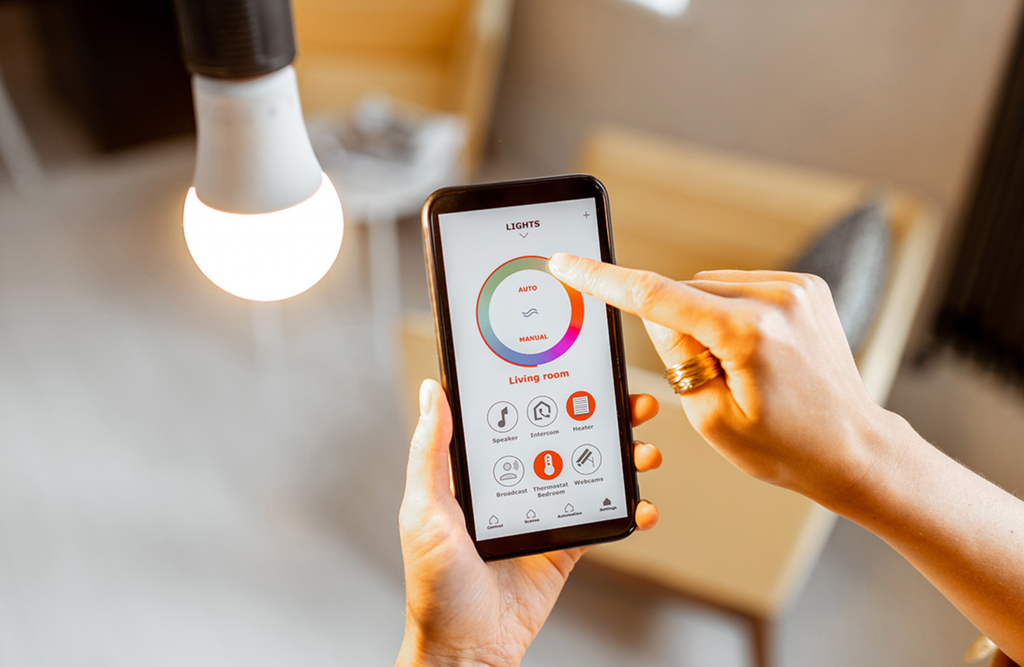
The controller is whatever you touch or speak to: a phone app, a voice assistant, a wall button, a motion sensor, or a rule that runs by itself at sunset. Many households end up using three or four of these in different situations. The phone is best for setup and fine adjustment, voice is convenient with full hands, and a physical button is what visitors and children will reach for first. Choosing hardware that supports more than one controller keeps the system pleasant when your phone is in another room.
Picking hardware for the fixtures you own
Start by walking through the house and looking at what each fixture holds. A lamp with a single screw-in bulb is the easiest case, because swapping the bulb is the whole job. A ceiling fitting with five small bulbs is harder, since replacing all five with smart versions costs more and each one needs its own pairing. In that case a smart switch or dimmer on the circuit can be a better answer, though it involves wiring and, in many places, a qualified electrician.
Check the physical details before you add anything to a basket. Socket types and sizes differ between countries, and even within one country older fittings may use something unusual. Enclosed glass shades can trap heat, so look for a bulb marked as suitable for enclosed fixtures. Recessed ceiling lights often want a particular shape and beam angle, and a bulb that is slightly too fat will simply not fit.
Compatibility with the voice assistant or home app you already use deserves a line on your checklist. Packaging normally lists the supported platforms, and the Matter logo indicates a shared standard meant to let products from different makers cooperate. Support for Matter varies between products and between apps, so treat the logo as a good sign rather than a guarantee, and read what the listing says about your specific platform.
Think about the light distribution as well as the hardware. A bulb that points its light straight down suits a kitchen counter, while a frosted bulb that spreads light in every direction suits a table lamp under a shade. Poorly chosen beam shapes are one reason people judge a smart bulb harshly when the real problem is the fitting. Take the old bulb to the shop, or photograph its markings, so that you can match the base, the shape and the approximate lumens in one visit.
| Hardware type | Works best for | Main trade-off |
| Wi-Fi bulb | A first lamp, no hub wanted | Every bulb joins your router |
| Bluetooth bulb | One or two lamps in a room | Short range, limited remote control |
| Hardware type | Works best for | Main trade-off |
| Zigbee or Thread bulb | Whole-house setups | Needs a hub or compatible speaker |
| Smart switch or dimmer | Fixtures with several bulbs | Wiring work, possible electrician |
| Light strip | Shelves, cabinets, behind a screen | Accent light, not room lighting |
| Smart plug | Switching a basic lamp on and off | No dimming of the bulb itself |
Resist buying for the whole house on day one. A starter pack lowers the price per bulb, but it also locks you into one brand before you know whether you like the app, the speed of response and the quality of the white light. Buy a few, live with them for a month, and note which features you touch. Prices and promotions change often and differ by country, so compare a handful of shops instead of trusting one figure.
Pairing and naming that save trouble later
Setup rarely takes long, but a few habits prevent most of the early frustration. Screw the bulb into a lamp whose switch is on, open the maker’s app and follow the prompts, which usually ask you to hold the phone near the bulb. Pairing often needs Bluetooth and local network permission, and many bulbs can only join the 2.4 GHz Wi-Fi band. If your router merges its bands under a single network name, a phone connected to the faster band can confuse the process, and temporarily splitting the names is a common fix.
Do the first connection close to the router, then carry the bulb to its final position. If the bulb stops responding halfway through, the manual will describe a switch-off-and-on routine, often three to five quick cycles, that puts it back into pairing mode. Keep one thing in mind throughout: a bulb that has been reset forgets its room, its name and its scenes, so a reset is a last resort rather than a first one.
Add bulbs one at a time rather than screwing in six and starting a bulk pairing. When two fresh bulbs are powered together, the app may find both and ask you to pick one, and it is easy to name the wrong lamp. Pair, name, test the on and off commands from the app, and only then reach for the next bulb. It feels slower, but it avoids the muddle that sends people into the reset routine.
Names matter more than people expect. Choose phrases you can say comfortably and that sound different from each other, such as “reading lamp” and “kitchen ceiling”, instead of “light 1” and “light 2”. Put each bulb into a room group at once, because scenes, voice commands and schedules all rely on groups. Ten minutes spent naming things at the start saves a great deal of squinting at an identical list later.
The wall switch is the part that trips up families. If it is turned off, the bulb loses power and cannot hear anything, and when it is turned back on some bulbs return to a default white rather than your last setting. Tape a small label over the switch, fit a plastic switch guard, or give people a wireless button in the same place so that the habit of reaching for the wall has somewhere safe to land.
Scenes worth keeping
A scene is a stored recipe: certain lights at certain brightness and color, recalled with one tap, one phrase or one button. The hardest part is not the technology but the restraint. Most apps ship with a gallery of dramatic presets named after beaches and sunsets, and almost nobody uses more than three or four scenes in a room. Build around activities that repeat daily, and let your own habits, not the preset gallery, decide the list.
Living room
A living room usually needs a bright cleaning or tidying scene, a warm evening scene for conversation and a low scene for films. The film scene is a good place to practice layering. Switch the ceiling light off entirely, leave one lamp at a low level behind the sofa and perhaps a strip behind the television at a similar warmth. Light behind a screen reduces the contrast between the picture and the wall, which many people find easier on the eyes.
Kitchen and work areas
In a kitchen, the scene that matters is a cool, bright one for chopping and reading recipes, plus a dim warm one for late snacks. A home office benefits from a focus scene in neutral white and a shutdown scene that dims everything when the working day ends. Putting the desk lamp in both scenes, but at different strengths, gives you a visual cue that the working day has changed gear.
Bedrooms
A bedroom wants gentle scenes. A reading scene at modest brightness and warm color, and a night scene at the lowest setting that still lets you cross the room safely, will do most of the work. For children, a very dim amber night scene tied to a button on the wall is easier and kinder than a screen. Test every bedroom scene in the dark, since a setting that looks soft at midday can feel dazzling at midnight.
Keeping scenes shareable
If several people use the system, agree on names and keep the list short. Delete the experiments, avoid duplicates, and write down the five phrases that work with the voice assistant so that nobody has to guess. A cluttered scene list is one of the main reasons a household drifts back to flipping the wall switch.
A wireless button or small dial beside the sofa makes scenes feel like part of the room instead of a phone feature. Assign a short press to the main evening scene and a long press to turn everything off, and almost nobody will need an explanation. Children and guests tend to prefer something they can press over an app they must install, and it keeps lights usable when the phone is charging in another room.
Schedules, sensors and routines
A schedule performs an action at a time, and a routine is the broader idea: a trigger such as a clock time, sunrise, sunset, a button, a door sensor or a phone arriving home, followed by one or more actions. Time-based schedules are the easiest first step. Sunrise and sunset triggers are especially handy because they follow the seasons without any manual changes, which keeps an evening lamp from coming on at a pointless hour in midsummer.
Waking up and winding down
A gradual wake-up, in which a bedroom lamp climbs from dark to a comfortable level over ten or fifteen minutes, feels gentler than a sudden alarm for many people. In the evening, a routine that moves the main lights to a warmer and dimmer scene as bedtime approaches is popular, and it costs nothing after the first setup. A final routine that turns off every downstairs light in one go saves the last tour of the house.
Sensors and presence
Motion sensors earn their place in hallways, garages, cupboards and bathrooms, where you want light for a short time and have your hands full. Set the timeout generously, because few things are more irritating than a light that switches off while you are still reading in the bath. Presence rules, which use the location of phones to turn lights off when the last person leaves, are convenient but need care about privacy and about guests who have no phone registered.
When a routine misbehaves
When a rule does something strange, the cause is nearly always simple. Check the time zone on the phone and any hub, confirm the bulb was online at the moment the rule ran, and look for two rules that give conflicting instructions at the same time. Change one thing at a time and test it before moving on. If you are away for several days, a modest evening pattern can make a home look occupied, but treat it as one small part of home security, not a replacement for locks and sensible habits.
Daylight changes what a good schedule looks like. In a bright room you may need no light at all until well after midday, and a rule that fires at a fixed clock time will waste energy on a sunny afternoon. Sunset triggers handle most of this, and some systems can also react to a light sensor. If your bulbs offer an automatic mode that drifts from cool to warm over the day, try it for a week before writing your own rules, since it may already do what you want.
Brightness, warmth and the energy arithmetic
Color temperature is measured in kelvins. Values near 2700 K look warm and yellowish like old filament bulbs, the range between about 3000 and 4000 K looks neutral, and 5000 K and above looks cool and bluish like open daylight. Warm tones tend to suit relaxing, and cooler tones suit tasks with small detail. Many people prefer to shift toward warmer light in the evening, and the choice is largely about comfort, so trust what feels good in your own room.
Brightness is measured in lumens, and it is the number to compare when replacing an old bulb. Wattage on an LED tells you only how much power the bulb draws, not how much light it gives. Many packages print an approximate equivalent to a traditional bulb, which makes the comparison easier. Another figure worth a glance is the color rendering index; a higher value generally shows skin, food and fabric more faithfully, which matters in bathrooms and kitchens.
Layering beats raw output. One bright ceiling light flattens a room and wastes power, while a ceiling light at a low level plus a reading lamp beside the chair gives you light where the task is. A task lamp throwing a pool of light on a desk lets the rest of the room stay dim, and that is both more pleasant and cheaper to run. If you are unsure how bright a space needs to be, start low and raise the level until you stop squinting, then save that value as a scene.
Now to the money. Most of the saving in any lighting upgrade comes from the LED itself, which produces the same light as an older incandescent bulb for a small fraction of the electricity. If you are replacing old bulbs, you will see a large drop in power use whether or not the new bulb is smart. Smart features add savings through behavior: dimmed lights draw less, schedules turn lights off in empty rooms, and motion sensors keep a hallway dark when nobody is there.
There is a cost on the other side of the ledger. A smart bulb keeps its radio awake all the time, and that standby draw is commonly a fraction of a watt up to around a watt, depending on the design. Across a house of twenty bulbs it adds up slowly, yet it is usually well below the amount you save by using LEDs and by switching lights off. Hubs and bridges also draw a little power, so keep the count of extra boxes modest.
| Habit or upgrade | Effect on electricity use | Effort needed |
| Replace an old bulb with an LED | Large drop for that light | Low |
| Run lamps at lower brightness | Moderate drop while dimmed | Low |
| Schedule lights off at bedtime | Cuts waste in empty rooms | Medium |
| Motion sensor in a hallway | Light only when needed | Medium |
| Smart bulb in a rarely used room | Little saving, small standby draw | Low |
Work out your own numbers with a simple check. Note how many hours a typical light is on each day, compare the wattage of the old and new bulbs, and multiply by the price per unit on your electricity bill. Tariffs vary by country and provider, so your own bill is a better guide than any generic claim. A light that burns for only ten minutes a day will never repay its cost in energy, and the case for making it smart rests on convenience instead.
Safety, updates and keeping things working
Smart bulbs are small networked computers, and a little routine care keeps them dependable. Choose makers who publish updates and explain what they do with your data, create the account with a unique password, and turn on two-step sign-in where it is offered. Read the permissions the app requests and decline anything that has nothing to do with lights, such as access to your contacts.
Updates and the network
Accept firmware updates when the app offers them, ideally at a quiet moment, since a bulb can be unresponsive for a few minutes while it installs. Keep the router updated and change any default administrator password on it. If your router offers a guest or separate smart-home network, placing bulbs there keeps them away from laptops that hold personal files, though some bulbs need to share a network with the phone, so test before moving everything.
When the internet drops
Think about what happens when the internet or the maker’s service is down. Bulbs controlled locally through a hub can usually keep running schedules and answering buttons, while cloud-only bulbs may stop responding to the app and voice assistant. A working wall switch, a wireless button or a dimmer remote gives everyone a fallback, and a babysitter or visitor will be glad that the lights work without an app.
Common faults
If one bulb goes offline while its neighbors work, the signal is probably weak. Move the router, add a mesh extender, or place a mains-powered mesh device partway between the hub and the bulb. Metal fixtures and thick walls weaken wireless signals, so a bulb wrapped in a metal shade may struggle. Flickering on an old wall dimmer is common because many dimmers were built for older bulbs; set the dimmer to full and control brightness in the app, or replace it with a smart switch.
Anything involving fixed wiring should be done with the power off at the breaker, and in many places local rules require a qualified electrician for it. If a bulb ever smells odd, feels unusually hot or flickers constantly, switch it off, let it cool and stop using it. Plug-in lamps and screw-in bulbs need none of this work, which is one more reason they make a sensible starting point.
A sensible order of purchases
Begin with one room, the one where you spend the most evening hours. Fit a pair of bulbs or a smart switch there, pair them, name them plainly and group them under the room name. Keep the wall switch on and add a wireless button so that other people have an easy manual option. That small kit is enough to learn how the app behaves and how the light looks.
After a week, create three scenes for that room, perhaps bright, relaxed and low, and adjust them until they feel right at the hours you really use them. Then add a single schedule that removes one daily chore, such as a sunset trigger for the evening lamp or a bedtime routine that switches off the lower floor. One automation that works every day is worth more than ten that nobody trusts.
Only then think about expansion. Review how long each light really stays on, compare old and new bulb wattage, and decide whether the next purchase is about comfort, safety or savings. Add rooms one at a time, update firmware as prompts appear, and keep a short note of which bulb sits where. If a purchase has no job to do, leave it on the shelf.
Frequently Asked Questions
Do smart bulbs work without Wi-Fi?
Bluetooth bulbs can be controlled from a nearby phone without any router, and bulbs on a hub can keep running local schedules during an outage. Wi-Fi-only bulbs lose app and voice control when the connection drops. Any bulb will still give plain light if the wall switch is on.
Can I use smart bulbs with a regular dimmer switch?
It is usually best not to. Many wall dimmers are designed for older bulbs and cause flicker or stop smart bulbs from responding correctly. Set the dimmer to full, or swap it for a smart switch.
Do smart bulbs use electricity when turned off?
When switched off by the app, the bulb stays in standby so it can hear the next command. That draw is typically a fraction of a watt up to about a watt. Switching off at the wall removes it, but also removes smart control.
How long do smart bulbs last?
The LED inside commonly carries a rated life of many thousands of hours, which can mean years of normal use. Check the packaging and warranty for the figure on your product. The smart features may end sooner if the maker stops supporting the app.
Can I control my lights when I am away from home?
Yes, if the bulbs or their hub connect to a service that can be reached from outside your network. Bluetooth-only bulbs usually cannot do this. Use a strong account password and two-step sign-in if offered.
Are color-changing bulbs worth paying extra for?
Only if you will use the color. Tunable white, which moves between warm and cool, suits most rooms. Full color is mainly for decoration and mood.