A single router sitting in one corner of a home was never designed to blanket every room with equal signal strength, which is why so many households live with a spot upstairs or in a back bedroom where video calls freeze and pages load slowly. Mesh Wi-Fi systems solve this by spreading coverage across several small units placed throughout a home, each one relaying the signal to the next so a device moves seamlessly between them without dropping connection.
Unlike older range extenders that simply rebroadcast a weaker copy of the same signal, a true mesh system shares one network name and intelligently routes traffic through whichever node gives the strongest path. This guide explains how mesh systems work, how to compare them with other options, how to plan node placement, and how to troubleshoot the most common setup problems.
Eliminating Dead Zones With Multiple Nodes
A traditional router broadcasts from a single point, and its signal naturally weakens with distance and gets blocked further by walls, floors, and large appliances. A mesh system instead distributes several nodes around a home, each one acting as both a receiver and a transmitter, so a signal only has to travel a short distance before reaching the next node in the chain. This layered approach is what allows a mesh network to reach rooms a single router never could.
The practical benefit shows up most clearly in larger homes, multi-story layouts, or houses with dense building materials like brick or concrete that block signal more aggressively than drywall. A node placed roughly in the middle of a previously weak area can turn a connection that constantly dropped into one that holds steady through video calls and large downloads. Unlike a single powerful router, adding coverage with a mesh system is as simple as adding another node rather than replacing the entire setup.
- Living room or central hub node: Usually the main unit connected directly to the modem, placed centrally for the strongest starting signal.
- Secondary floor node: Positioned near a staircase or hallway to carry signal between levels of a home.
- Garage or outdoor-facing node: Useful for households that want coverage extending to a driveway, patio, or detached workspace.
- Dead zone fill-in node: Added specifically in a known weak spot identified through a signal test, rather than following a generic placement rule.
Because every node shares a single network name, a phone or laptop moves between them automatically as a person walks through the house, without the manual reconnecting that older extender setups often required. This seamless handoff relies on a technology sometimes called band steering, where the system decides in the background which node and which wireless frequency a device should use at any given moment, rather than leaving that choice to the device itself.
Older networking setups often left a phone clinging to a distant, weak node simply because it had connected there first and never actively searched for a closer option. A well-tuned mesh system removes that friction entirely, continuously reassessing signal strength and quietly reassigning a device to a stronger node without any visible interruption to whatever that device happens to be doing at the time.
Comparing Mesh Systems to Traditional Routers
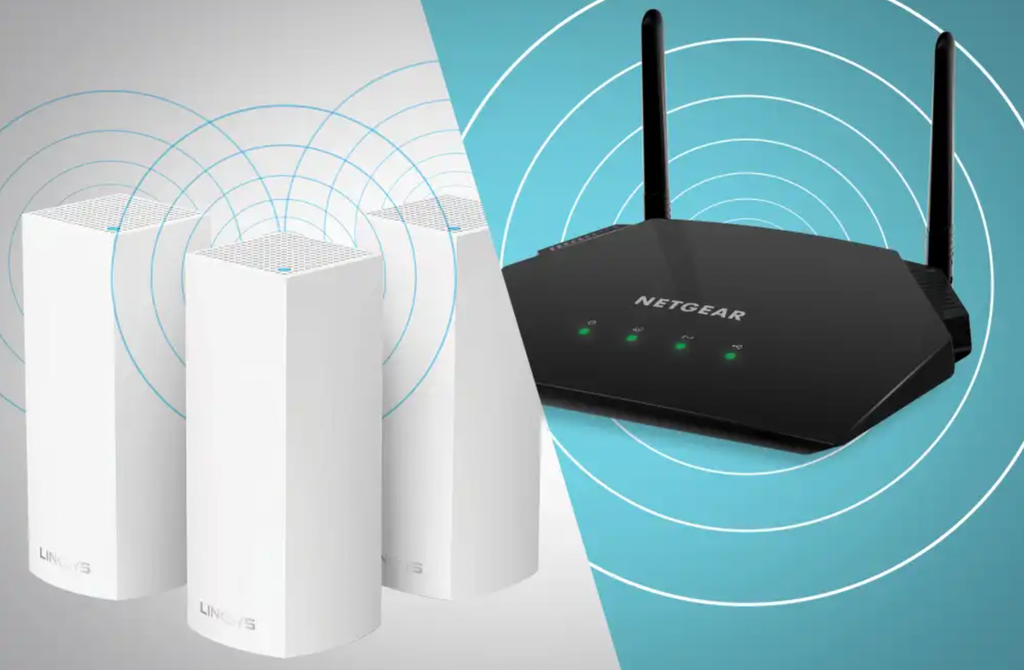
A single traditional router remains the simpler and cheaper option for small apartments or single-story homes with few obstructions, since one well-placed unit can often cover the entire space without added equipment. Mesh systems become worthwhile once a home’s layout, size, or building materials create more than one weak spot that a single router cannot reach no matter where it sits.
Cost is the most direct tradeoff. A capable single router can be bought for a modest price, while a mesh system with two or three nodes typically costs several times as much, reflecting the additional hardware and more complex coordination between units. That higher price buys more consistent coverage and, in many systems, simpler management through a mobile app that shows connected devices and node performance at a glance.
- Setup complexity: A single router typically needs one cable connection, while a mesh system requires placing and powering multiple units around a home.
- Price range: Mesh systems generally cost more upfront, scaling with the number of nodes purchased.
- Coverage consistency: Mesh systems maintain more even signal strength throughout a larger space compared with a single router’s naturally uneven range.
- Management tools: Most mesh systems include an app with device lists, speed tests, and parental controls built in, often more detailed than a standalone router’s interface.
Older range extenders sit in a middle category worth mentioning separately. They are cheaper than a full mesh system but typically create a second network name, which means a device has to manually switch networks when moving between zones, a step true mesh systems are specifically designed to avoid.
Placing Nodes for the Best Signal

Node placement has more effect on mesh performance than almost any other factor, more than the brand or price point of the system itself. The general rule is to position each node within line of sight, or at least within one or two rooms, of the node before it in the chain, since signal strength drops sharply with distance and with each wall it has to pass through. A node placed too far from its neighbor creates a weak link that drags down performance for every device connecting through it.
Elevating nodes off the floor, ideally on a shelf or mounted on a wall at roughly head height, improves signal spread compared with placing a unit on the ground where furniture and floor clutter block the signal. Keeping nodes away from large metal objects, mirrors, and thick concrete walls also helps, since these materials interfere with wireless signals more than wood, drywall, or glass.
- Mid-point placement: Position a node roughly halfway between the main router and the dead zone it needs to cover, rather than right next to either end.
- Open sightlines: Avoid placing nodes inside cabinets, behind large furniture, or in closets where signal gets trapped.
- Elevated mounting: Shelves or wall mounts typically outperform floor-level placement for broadcasting signal evenly.
- Distance from interference sources: Keep nodes a reasonable distance from microwaves, cordless phone base stations, and large metal appliances.
Most mesh system apps include a built-in signal strength test that highlights weak connections between nodes, which takes the guesswork out of fine-tuning placement after the initial setup. Interior wall construction varies by home, and this detail affects placement decisions more than most people expect going in.
Older homes built with plaster and metal lath, common in many houses built before mid-century, block wireless signal more aggressively than newer drywall construction, sometimes requiring an extra node to bridge a gap that would be a single easy hop in a newer building. Testing signal strength room by room during initial setup, rather than assuming a standard spacing rule will work identically in every home, accounts for this kind of structural variation.
Troubleshooting Common Mesh Network Problems
Even a well-planned mesh system runs into occasional issues, and most trace back to a small set of recurring causes. Slow speeds on one specific device, while others perform fine, often point to that device connecting to a farther node instead of a closer one, a problem usually fixed by restarting the device so it re-selects the strongest available signal. Persistent dead spots despite having a node nearby usually mean that node needs to be moved closer to the router or repositioned around an obstruction.
Firmware updates matter more for mesh systems than they did for older standalone routers, since the nodes need to stay synchronized with each other as well as with the manufacturer’s software. Skipping updates for an extended period can cause nodes to fall out of sync, leading to intermittent drops that are hard to diagnose without first checking whether an update is overdue.
- One slow device among many: Restart the device to force it to reconnect to the nearest node rather than a farther one it latched onto earlier.
- Persistent dead spot near a node: Move the node closer to the router or reposition it away from walls and interference sources.
- Frequent disconnects across the network: Check for a pending firmware update across all nodes, since outdated software is a common cause.
- Slow speeds throughout the house: Confirm the internet plan’s measured speed matches what the mesh system is reporting, since the bottleneck may be the connection itself rather than the mesh hardware.
When these basic steps fail to resolve a problem, most manufacturers offer a factory reset option that clears node pairings and lets the whole system be rebuilt from scratch, which resolves deeper configuration errors that accumulate over time.
Weighing Bandwidth Needs for Different Households
Not every household needs the same mesh system, and the right choice depends heavily on how many devices connect and what those devices are doing. A household streaming video on several screens, running smart home devices, and supporting a few people on video calls simultaneously needs more bandwidth headroom than one or two people mostly browsing and emailing. Mesh systems vary in how much total throughput they can handle, and a system built for a small apartment may struggle under the combined weight of a larger, more connected household.
Wired backhaul, where nodes connect to each other through a cable rather than relying purely on wireless signal to communicate, offers a real performance boost for demanding households willing to run that cable between rooms. This setup removes one of the biggest bottlenecks in wireless-only mesh systems, since the nodes no longer compete for the same wireless spectrum used to serve connected devices.
- Streaming-heavy households: Need higher sustained bandwidth to support multiple simultaneous video streams without buffering.
- Smart home device density: A home with many connected sensors, cameras, and speakers benefits from a mesh system rated for a higher device count.
- Remote work and video calls: Stable, low-latency connections matter more here than raw top speed.
- Gaming households: Benefit most from wired backhaul connections between nodes, since latency matters as much as throughput for a responsive connection.
Checking a mesh system’s rated device capacity and maximum throughput before buying helps match the hardware to a household’s real needs rather than over- or under-buying for the space.
Future growth is worth factoring into this decision as well, since a household that adds several more smart devices, a new television, additional cameras, a growing collection of connected sensors, over the following year or two can quickly outgrow a system purchased with only current needs in mind. Choosing a mesh system with some headroom above present requirements, rather than the exact minimum that covers today’s device count, avoids a premature upgrade and the cost of replacing hardware sooner than expected.
Extending Mesh Coverage to Outdoor Spaces
A backyard, patio, or detached garage often sits just beyond the reach of an indoor mesh setup, leaving outdoor smart cameras, speakers, or a laptop used on a porch without a reliable connection. Extending a mesh network outdoors generally requires either a weatherproof outdoor-rated node, built specifically to withstand rain and temperature swings, or careful placement of an indoor node near a window or exterior-facing wall where some signal can pass through to the space just outside.
Outdoor-rated nodes are purpose-built for this exact scenario, with sealed housings that protect internal electronics from moisture while still broadcasting a usable signal several dozen feet beyond their mounting point. These units typically mount to an exterior wall or a covered eave, positioned to balance proximity to an existing indoor node against exposure to direct weather that could shorten the unit’s lifespan over time.
- Weatherproof node housings: Sealed against rain and humidity, built to survive temperature extremes that an indoor node is not rated to handle.
- Covered mounting locations: Placing an outdoor node under an eave or awning reduces direct weather exposure while preserving signal reach.
- Line-of-sight to indoor nodes: Keeping a clear path between an outdoor node and its nearest indoor neighbor improves connection reliability.
- Seasonal signal checks: Foliage that grows in over a spring and summer can weaken a previously strong outdoor connection, worth rechecking periodically.
For households that rely on outdoor security cameras or want reliable Wi-Fi on a deck or patio, this additional investment in outdoor-rated hardware closes one of the few remaining gaps a standard indoor mesh setup leaves unaddressed.
Final Thoughts
Mesh Wi-Fi systems address a real problem that single routers were never built to solve: consistent coverage across every room of a home, regardless of size or building material. The investment makes the most sense for larger homes, multi-story layouts, or households with persistent dead zones that no amount of router repositioning has fixed.
Getting the most from a mesh system comes down to thoughtful node placement, keeping firmware current, and matching the system’s capacity to a household’s real device count and bandwidth habits. Done well, a mesh network fades into the background entirely, which is exactly the point.
Whether a household chooses two nodes or six, the underlying goal stays the same: a connection that holds steady in every room, regardless of where a person happens to be sitting with a laptop or standing with a phone in hand.
Frequently Asked Questions
How many mesh nodes does an average home need?
Most two- or three-bedroom homes are well served by two or three nodes, while larger homes or those with unusual layouts may need four or more. Running a signal test after installing the initial nodes helps confirm whether additional units are worth adding. A home with an open floor plan and few interior walls can sometimes achieve full coverage with fewer nodes than a home of similar square footage divided into many smaller, closed-off rooms, since each additional wall a signal has to cross reduces its effective reach.
Can a mesh system replace a modem as well as a router?
No, a mesh system handles the router function, distributing Wi-Fi throughout a home, but it still connects to a separate modem that brings the internet connection in from an internet service provider. The two devices serve different purposes even though some setups bundle them visually, and a small number of combined modem-router devices exist that fold both functions into a single unit, though these are typically offered as a separate product category from a dedicated mesh system.
Do mesh systems slow down overall internet speed compared with a single router?
A well-placed mesh system should not noticeably reduce speed compared with a single router, since each node is designed to relay signal with minimal loss. Poor placement or too few nodes for a space can cause slowdowns, but this reflects setup rather than a built-in limitation of mesh technology.
Is it possible to mix mesh nodes from different brands?
Generally no. Mesh systems are designed to work together using a specific manufacturer’s proprietary coordination protocol, so nodes from different brands typically cannot be combined into one network, even if they appear compatible on paper. A newer industry standard aimed at cross-brand mesh compatibility has started to appear in some products, though adoption remains limited enough that sticking with a single manufacturer’s full node lineup remains the more dependable path for most households today.
How often should mesh nodes be restarted or reset?
Most mesh systems do not need regular manual restarts, since they are designed to run continuously and update automatically. A restart is mainly useful when troubleshooting a specific issue rather than as routine maintenance.
Can a mesh system support a smart home with many connected devices?
Yes, and this is one of the stronger use cases for mesh systems, since the distributed nodes handle a higher device count more gracefully than a single router straining to serve dozens of connected gadgets from one point.