
Choosing the best MacBook for students is a crucial decision that can influence productivity, creativity, and overall academic success. Apple offers multiple MacBook models, each tailored to specific needs, whether you require portability, performance, or advanced multimedia capabilities. This guide explores all aspects students should consider when selecting their ideal MacBook, ensuring a balance between price, performance, and long-term usability.
Why MacBooks Are Ideal for Students
Apple MacBooks are highly preferred by students for a combination of factors:
- High Performance: With Apple’s M-series processors, MacBooks handle multitasking, coding, graphic design, and video editing efficiently.
- Exceptional Battery Life: Modern MacBooks provide up to 18-22 hours of battery life, reducing the need to carry chargers during a busy academic day.
- Sleek Design and Portability: Lightweight and slim profiles make MacBooks easy to carry between classrooms, libraries, and dorm rooms.
- Seamless Ecosystem: Integration with iCloud, iPhone, iPad, and Apple Watch ensures that files, notes, and messages are synchronized across all devices.
MacBook Air vs. MacBook Pro: Which Is Right for Students?
MacBook Air (M2 and M3 Models)
The MacBook Air is widely regarded as the top choice for most students. Its combination of light weight, affordability, and strong performance makes it ideal for daily academic tasks.
Key Features:
- Ultra-Lightweight Design: Weighing just 2.7 pounds, it is easy to transport.
- Display Quality: 13.6-inch Retina display with True Tone ensures bright and clear visuals for reading, presentations, and video streaming.
- Powerful Chip: M2 or M3 chips provide fast performance for note-taking, browsing, and light multimedia work.
- Battery Longevity: Up to 18 hours of battery life, ideal for long study sessions.
- Storage Options: From 256GB to 2TB SSD, offering fast access to all academic files and software.
Perfect For: Students who need a lightweight, efficient, and budget-friendly laptop for lectures, research, and general productivity.
MacBook Pro 14 and 16 (M2 Pro/Max)
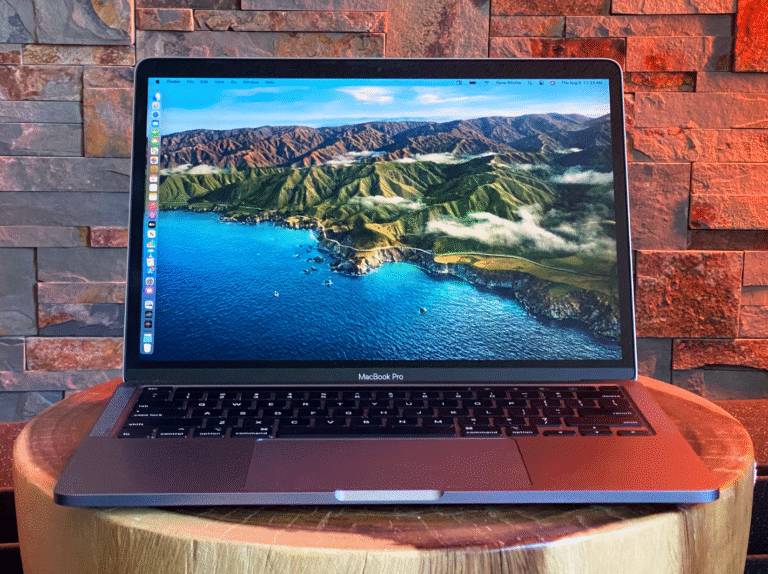
The MacBook Pro is designed for students who need high-end performance for demanding tasks like video editing, 3D modeling, engineering software, and coding.
Key Features:
- Powerful Performance: Equipped with M2 Pro or M2 Max chips, capable of handling intensive applications such as Final Cut Pro, MATLAB, AutoCAD, and Adobe Creative Suite.
- Advanced Display: Liquid Retina XDR display with ProMotion technology delivers excellent color accuracy and smooth visuals for creative projects.
- Extended Battery Life: Up to 22 hours, supporting full-day usage without frequent charging.
- Ample Storage: Configurations up to 8TB SSD for storing large academic projects, multimedia files, and datasets.
- Versatile Ports: Includes Thunderbolt 4, HDMI, and SDXC card slots for seamless connectivity with peripherals and external displays.
Perfect For: Students pursuing creative arts, computer science, engineering, or media studies who require maximum performance and storage.
Essential Factors to Consider for Students
1. Budget Planning
MacBooks are premium laptops. MacBook Air M2 offers a cost-effective option without sacrificing performance, while MacBook Pro models are higher-priced but provide top-tier features. Evaluate academic needs to avoid overspending.
2. Performance Requirements
- Basic Tasks: Web browsing, online classes, note-taking: MacBook Air M2 or M3.
- Professional Software: Video editing, programming, 3D modeling: MacBook Pro 14-inch or 16-inch.
3. Portability vs. Power
- Portability: MacBook Air is ideal for moving around campus.
- High Performance: MacBook Pro is heavier but offers superior computing power for intensive tasks.
4. Battery Life Considerations
Students attending back-to-back lectures or labs need laptops with extended battery life. MacBook Air delivers excellent endurance, while MacBook Pro ensures all-day performance under heavy workloads.
5. Storage and RAM Requirements
- RAM: Minimum 8GB for regular multitasking; 16GB or more for creative and technical software.
- Storage: SSDs ranging from 256GB to 2TB for MacBook Air, and up to 8TB for MacBook Pro, depending on file and project size.
Top MacBook Accessories for Students
- Protective Sleeve or Case: Protects against scratches and accidental drops.
- External SSD or Hard Drive: Provides backup for large files and projects.
- USB-C Hub: Adds connectivity for HDMI, SD cards, and other peripherals.
- Wireless Mouse and Keyboard: Enhances productivity for coding and design tasks.
- AppleCare+: Extends warranty and covers accidental damage, a wise investment for students.
Tips for Optimizing MacBook Use in Academic Life
- Organize Notes Digitally: Apps like Notion, OneNote, and Apple Notes help manage class notes efficiently.
- Use Cloud Storage: Services like iCloud, Google Drive, or Dropbox ensure access to files from anywhere.
- Battery Optimization: Reduce screen brightness and use low-power mode to extend battery life.
- Keep Software Updated: Regular updates enhance security, stability, and compatibility.
- Leverage Productivity Tools: Apps like Grammarly, Todoist, Trello, and MindNode improve time management and organization.
Recommended MacBook Models for Students
| Model | Ideal Use | Weight | Battery Life | Starting Price |
|---|---|---|---|---|
| MacBook Air M2 | Daily tasks, note-taking, browsing | 2.7 lbs | 18 hours | $1,199 |
| MacBook Air M3 | Lightweight, efficient student workflow | 2.7 lbs | 18 hours | $1,299 |
| MacBook Pro 14-inch M2 Pro | Creative tasks, coding, video editing | 3.5 lbs | 17 hours | $1,999 |
| MacBook Pro 16-inch M2 Max | Professional work, heavy-duty projects | 4.7 lbs | 22 hours | $3,499 |
Conclusion: Making the Right Choice
Selecting the best MacBook for students depends on balancing performance, portability, and budget. For most academic purposes, MacBook Air M2 or M3 delivers excellent performance, portability, and battery life. Students in specialized fields requiring high computational power or multimedia editing should consider the MacBook Pro 14-inch or 16-inch. By choosing the right MacBook, students ensure a productive, smooth, and reliable academic journey while leveraging Apple’s integrated ecosystem for maximum efficiency.